IT:AD:Documentation:SAD:RAW:Example:1:06 Appendices
Document DataStore Location
Rozanski and Woods SAD Structure Concepts
Summary
The following is a summary of key concepts used to describe Systems using the Rozanski and Woods View/Viewpoint based structure.
Standard Architectural View Descriptions

The Rozanski and Woods View/Viewpoint document structure describes the complexity of the solution's systems by describing in a series of curated views, prepared from the point of view – the viewpoint – of key stakeholders.
A description of the standard architectural views are as follows:
- System Context View: the relationships, dependencies, and interactions between the system and its environment (the people, systems, and external entities with which it interacts). Includes the system’s runtime context and its scope and requirements.
- System Functional View: the system’s functional elements, their responsibilities, interfaces, and primary interactions; drives the shape of other system structures such as the information structure, concurrency structure, deployment structure, and so on.
- System Information View: the way that the architecture stores, manipulates, manages, and distributes information. This viewpoint develops a complete but high-level view of static data structure and information flow to answer the big questions around content, structure, ownership, latency, references, and data migration.
- System Concurrency View: the concurrency structure of the system and maps functional elements to concurrency units to clearly identify the parts of the system that can execute concurrently and how this is coordinated and controlled.
- System Development View: the architecture that supports the software development process. Development views communicate the aspects of the architecture of interest to those stakeholders involved in building, testing, maintaining, and enhancing the system.
- System Deployment View: the environment into which the system will be deployed, and the dependencies the system has on its runtime environment. Deployment views capture the system’s hardware environment, technical environment requirements, and the mapping of the software to hardware elements.
- System Operational View: how the system will be operated, administered, and supported when it is running in its production environment, by identifying system-wide strategy.
Stakeholders
Rozanski and Woods state that stakeholders should be Informed, Committed, Authorized, Representative.
Rozanski and Woods classify stakeholder roles according to the following categories:
- Acquirers: Oversee the procurement of the system or product
- Assessors: Oversee the system’s conformance to standards and legal regulation
- Communicators: Explain the system to other stakeholders via its documentation and training materials
- Developers: Construct and deploy the system from specifications (or lead the teams that do this)
- Maintainers: Manage the evolution of the system once it is operational
- Production Engineers: Design, deploy and manage the hardware and software environments in which the system will be built, tested and run
- Suppliers: Build and/or supply the hardware, software, or infrastructure on which the system will run
- Support staff: Provide support to users for the product or system when it is running
- System administrators: Run the system once it has been deployed
- Testers: Test the system to ensure that it is suitable for use
- Users: Define the system’s functionality and ultimately make use of it.
Rozanski and Woods (RaW) Resources
Glossary
Summary
Common System Documentation Terms
- SAD: Solution Architecture *Description document* used to describe the complexity of a system model in curated views appropriate to the viewpoint of specific stakeholders.
- TDD: Technical Design Document. One or more continuation documents to technically expand on a SAD's Development View.
- UML: Unified Modeling Language: a general-purpose, (mostly visual) modeling language used to visualize system design in a in an unambiguous standard way1).
- ArchiMate: an modeling language to describe, analyse and visualize enterprise architecture in an unambiguous way2).
- RaW: Rozanski and Woods, authors of the seminal “Software Systems Architecture” within which was presented a SAD structure based on Views, Viewpoints, Perspectives. The Rozanski and Woods View/Viewpoint document structure describes the complexity of the solution's systems by describing in a series of curated views, prepared from the point of view – the viewpoint – of key stakeholders:
- Stakeholder: A stakeholder in the architecture of a system is a individual, team, organization, or classes thereof, having an interest in the realization of the system.
- View: A view is a representation of one or more structural aspects of an architecture that illustrates how the architecture addresses one or more concerns held by one or more of its stakeholders.
- Viewpoint: A viewpoint is a collection of patterns, templates, and conventions for constructing one type of view. It defines the stakeholders whose concerns are reflected in the viewpoint and the guidelines, principles, and template models for constructing its views.
- Perspective: An architectural perspective is a collection of activities, tactics, and guidelines that are used to ensure that a system exhibits a particular set of related quality properties that require consideration across a number of the system’s architectural views.
Common Quality Terms
* CIA: Confidentiality, Integrity, Availability * CIAP Confidentiality, Integrity, Availability and Privacy * AAA: Authenticated, Authorized, Accounted * 8A: Accessible, Anytime, Anywhere, Anyhow, Anyone, Appropriate, Audited, Accounted. A principle of providing Transparency up to the point it interferes with Protection. * MFA Multi-Factor Authentication * NDA Non-Disclosure Agreement * PIA Privacy Impact Assessment * DR Disaster Recovery * HA High Availability
Common System Delivery Management Terms
- BAU: Business As Usual
- PM: Project Manager
- Agile development and delivery: refers to a group of development methodologies based on iterative development, where requirements and solutions evolve through collaboration between self-organizing cross-functional teams.
- Scrum: is a lightweight process framework which is a subset of Agile – and the most widely-used variant.
- DevOps: DevOps is the union of people, Agile processes, and Services (ie Tools) to enable continuous delivery of value to end users, by removing barriers between Development, Operations and Quality Assurance, emphasizing communication, collaboration, and continuous automated integration, quality assurance and delivery.
- SAFe: Scaled Agile Framework. An Agile-based framework intended to expose large and cautious organisations to core elements of Agile in a 'safe' way.
- ITIL: Information Technology Infrastructure Library is a set of IT Service Management (ITSM) processes, procedures, tasks and checklists focused on aligning IT services with the needs of the organisation's strategy, business value and maintaining a minimum level of competency from a baselined plan. It's high opportunity cost to delivered value ratio is behind the DevOps movement.
Common Development Management Terms
- ALM Service: a Service to manage the product lifecycle (governance, development, support, and maintenance) of computer programs. It encompasses requirements management, software architecture, computer programming, software testing, software maintenance, change management, continuous integration, project management, and release management. 3).
- Continuous Integration: the automation of the process of optionally testing and managing the peer review of submitted branches, prior to integrating the new additions into the Main Branch branch. The range of testing done for Continuous Integration purposes can range from testing just code unit tests all the way up to the type of testing referred to as Continuous Testing.
- Continuous Testing: the automation of a complete suite of quality and functionality tests applied to submitted branches by implementing Continuous Integration.
* Continuous Delivery: the use of a Build Service and Deployment Service to automate of publishing built artefacts to a target environment (DT, BT, AT, IT, TRAINING or PROD). An optimal Continuous Delivery pipeline implements Continuous Testing, but it is still too common to have Continuous Delivery pipelines that rely on manual testing. To remove delivery delays such pipelines should work towards replacing the manual testing with automated testing. - Continuous Deployment: the use of a Build Service and Deployment Service to automate the publishing of built and fully tested (using Continuous Testing processes) artefacts every time code is submitted. A very high level of software delivery maturity is required to implement this process – hence why it is more often a target state than an achieved state.
- Version Control Service: a category of software tool to help a development team manage branching, integration and changes in general over time to source code and documents.
- TFVC: Team Foundation Version Control. A non-distributed Version Control system still in use for managing legacy projects. TFVC has largely been surplanted by the use of Git.
- Git: A decentralized, Distributed Version Control Service, which allows many software developers to work on a given project without requiring them to share a common network 4).
- Main branch: the primary branch of code in a Version Control Repository, to which submitted branches are merged, after – optionally – peer review and automated testing. See Continuous Integration. In older repository systems (eg: Subversion) the Main Branch was referred to as 'trunk'.
- Code Unit Testing: a form of Automated Testing which tests a single unit of code. See TDD.
- Test Driven Development (TDD): a development process where Code Unit Tests are developed prior to development, based on Acceptance Test Definitions.
- Acceptance Test Definition: An Agile work item, commonly referred to simply as an Acceptance Test. An Acceptance Test Definition is a text based definition of user or system functional acceptance test for a User Story. A User Story can – and should – have more than one Acceptance Test Definition (and by extension, Code Unit Test) associated to it. The format of an Acceptance Test Definition is GWT.
- GWT: is an acronym for Given-When-Then, a term to describe the format in which Acceptance Test Definitions are written ('Given <some input> And <another input> When <user does something> Then <the following will be the result>').
- User Story: an Agile work item which is a text based summary of a User stakeholder's desired functionality, written by BAs in the language of stakeholders. The informality of the language used within a User Story adds value for stakeholder engagement, but are incomplete and valueless without accompanying Acceptance Test Definitions. The forma is ''.
- Feature: an Agile work item comprised of several User Stories. They are distinct elements of functionality that can't be delivered in a single Sprint Iteration, but can be delivered in one Release.
- Release: although functionality is completed in each iteration, in some work environments, the product is held back before being released to users.
- Epic: an Agile work item that are significantly larger bodies of work. Epics are feature-level work that encompasses many Features, and the User Stories within them.
- Work Item Management Service: an service to manage Agile work items (Epics, Features, User Stories, Acceptance Test Definitions, Bugs).
- Build Service: a service that extracts from a Version Control Service's Repository the latest version of the code and compiles it. The compiled artefact is then tested in various ways.
- Deployment Service: a service that deploys the result of a Build Service job – the compiled code – to a target environment (DT, ST, AT, IT, TRAINING/PROD). Further post-deployment testing may be commissioned.
- Domain Driven Design: an software development approach based on placing the project's focus on domains – both their model and their logic – and initiating a creative collaboration and dialogue between technical and domain experts in order to iteratively refine a conceptual model that addresses particular domain problems. Key development concepts of DDD are listed below5):
- Entities: An object that is not defined by its attributes, but rather by a thread of continuity and its identity. In other words, an object with an ID.
- Value Object: An object that contains attributes but has no conceptual identity. They should be treated as immutable.
- Aggregate: a collection of objects that are bound together by a root entity, otherwise known as an aggregate root . The aggregate root guarantees the consistency of changes being made within the aggregate by forbidding external objects from holding references to its members. Your car is an aggregate of several objects. One of which is engine block with an ID (an Entity).
- Domain Event: a domain object that defines an event (something that happens). A domain event is an event that domain experts care about.
- Service: When an operation does not conceptually belong to any object. Following the natural contours of the problem, you can implement these operations in services.
- Repository: A Object management service wrapped around specialized storage.
- Factory: a Method for creating domain objects should delegate to a specialized Factory object such that alternative implementations may be easily interchanged.
- CQRS: Command Query Responsibility Segregation is an architectural pattern for separation of reads Queries – that do not mutate state – from writes Commands – which do6).
- AOP: Aspect-oriented programming makes it easy to factor out technical concerns (such as security, transaction management, logging) from a domain model, and as such makes it easier to design and implement domain models that focus purely on the business logic.
- DSL: domain-specific languages are restrained languages used to model a domain in order to communicate with less ambiguity with domain stakeholders and systems.
Development Terms
* ORM: An Object Relational Mapping System is one that provides an simple and abstract means to manage the storage and retrieval of entities from a datastore (eg: a sequential database). An example of an industry accepted .NET based ORM is Entity Framework7). * Entity Framework: an open source supported industry leading ORM system8). * GoF: The Gang of Four is the term used to refer to the authors of the seminal “Design Patterns: Elements of Reusable Object-Oriented Software software engineering pattern book. The Creational, Structural, and Behavioral patterns described in the book are simply known as GoF Patterns. * Command Pattern: a GoF Pattern: encapsulate a request as an object, thereby letting you parameterize clients with different requests, queue or log requests, and support undoable operations9). * Memento Pattern: a GoF Pattern: without violating encapsulation, capture and externalize an object's internal state so that the object can be restored to this state later10). * Chain of Responsibility: a GoF Pattern: avoid coupling the sender of a request to its receiver by giving more than one object a chance to handle the request. Chain the receiving objects and pass the request along the chain until an object handles it11). * Builder Pattern: a GoF Pattern: Separate the construction of a complex object from its representation so that the same construction process can create different representations12). * Factory Method Pattern: a GoF Pattern: Define an interface for creating an object, but let subclasses decide which class to instantiate. Factory Method lets a class defer instantiation to subclasses13). * Inversion of Control (Framework): a design principle in which portions of a computer program receive the flow of control from a generic framework.14) * Dependency Injection: a software design pattern that implements inversion of control for resolving dependencies. A dependency is an object that can be used (a service). An injection is the passing of a dependency to a dependent object (a client) that would use it. The service is made part of the client's state.[1] Passing the service to the client, rather than allowing a client to build or find the service, is the fundamental requirement of the pattern15). * Unity: a well known .NET Dependency Injection library. * StructureMap: a well known .NET Dependency Injection library. * SOLID: a set of 5 interconnected core principles of Object Oriented software development that improves adaptability and maintainability and value of the delivered code.
Structural Terms
* Component: a modular, replaceable, part of a system which defines behavior in terms of provided and required interfaces. * Artefact: a physical development deliverables. Eg: files, scripts, compiled .exe files, db tables, email message, etc. Node: model elements that represent general computational resources of a system, including servers, workstations (both of these are specifically devices), sensors, printing devices, etc. Nodes can be nested. Nodes can be connected by communication paths to describe network structures. * Device: a node which is a physical computational resource with processing capability upon which artifacts may be deployed for execution (eg: servers, workstations, etc). * Execution Environment: is a Node within a Device that represents software containers which offer an environment within which deployed artefacts components can be executed.
Data Management Terms
* OLTP: an Online Transaction Processing system is characterized by a large number of short on-line transactions (INSERT, UPDATE, DELETE). The main emphasis for OLTP systems is put on very fast query processing, maintaining data integrity in multi-access environments and an effectiveness measured by number of transactions per second. Typically, OLTP systems are used for order entry, financial transactions, customer relationship management (CRM) and retail sales. In OLTP databases there is detailed and current data and schema. Used by Operational Systems. * OLAP: an On-line Analytical Processing is characterized characterized by relatively low volume of transactions. Queries are often very complex and involve aggregations. OLAP applications are widely used by Data Mining techniques. In OLAP database there is aggregated, historical data, stored in multi-dimensional schemas (usually a star schema). Used by Data Warehouses. * Operational System: a term used in data warehousing to refer to a system used to process the day-to-day transactions of an organization. These systems are designed in a manner that processing of day-to-day transactions is performed efficiently while preserving integrity. Usually use OLTPs.16). * Data WareHouse: a system used for consolidating the data from several OLTP datastores, in order to meet reporting and data analysis requirements May use OLAPs17). * Data Mart: a simple form of a data warehouse focused on a single functional area, drawing data from a limited number of sources (eg: sales, finance or marketing). Often built and controlled by a single department within an organization. Can be Dependent, Independent and Hybrid data marts.
Integration Terms
* AD: Active Directory * ETL: Extract, Trasform and Load18) – a popular concept in the '70s – is a process of extracting data from one or more data sources (eg: databases), transforming the data into the target data format, and loading it into the target system. The system was intended to be used between operational datastores and target data warehouses, but many shops have also incorrectly used it to perform ETL between operational databases. ETL between systems is fine, but not via the database application programming interface, bypassing the application's programming interface. Using the Application's APIs has the benefit of providing authentication, authorisation, accounting, validation and triggered logic – while still providing Projections (ie, Transformations) using ODATA. * APIs: an Application Programming Inteface19) is an facing service endpoint, preferably externally facing and accessible by anyone, from anywhere, at anytime, anyhow, in an appropriate, audited and accounted manner (see 8A). * ODATA: Open Data Protocol20) is an industry accepted extensions to HTTP GET based REST Operations. * REST: Representational State Transfer21) Protocol is an HTTP based protocol which uses a limited HTTP based operation vocabulary. * SOAP: Simple Object Access Protocol22) is an alternative, older, web service protocol, which allows an arbitrary sets of operations, as opposed to REST which is based on only allowing a restrained vocabulary of operations.
Common System Operations Terms
- BWF: Basic Workflow
- BCP: Business Continuity Planning
- DR: Disaster Recovery
- DRP: Disaster Recover Planning
- GIW: Group Information Warehouse
- ID&R: Infrastructure Design and Reuse
- OOTB: Out of the Box
- SLA: Service Level Agreement
- SLAM: Service Level Agreement Monitoring
- SLAP: Service Level Agreement Ping|Pulse|
Common Ministry Terms
* ESAA: Education Sector Authentication & Authorisation * EDUMIS: EDUcation Management Information System * FIRST: Funding Information Regulatory System Technology * FUSION: Oracle Fusion Cloud Service (Enterprise Resource Planning – Financials) * Helios: Mythical Greek God (Name for the PMIS Replacement System) * FMIS: Financial Management Information System * PMIS: Property Management Information System * SE-RAD: Special Education – Rapid Application Development
Agile Summary
Summary
Agile is a development approach that emphasis:
- Continuous Delivery of Value to Stakeholders,
- Ongoing Stakeholder Engagement and Feedback,
- Avoiding effort lock-in in order to re-prioritize effort early and regularly as new information becomes available.
The Agile software development approach's proven benefit is the source of the DevOps approach. DevOps is an application of the learnings from the developmnt group, and applying them beyond, to all groups involved in the Software Development Lifecycle (SDLC).
Agile Stakeholder Engagement Benefits
A key benefit of the Agile approach – and therefore the DevOps approach – is stakeholder engagement.
The following two charts demonstrates succinctly the difference of stakeholder engagement, feedback and effort reprioritization.
Waterfall Delivery Stakeholder Engagement
Using older delivery patterns, key business and user stakeholder engagement is nearly absent bar immediately after project launch, when the solution should have been finished and requires repriorization and further funding, and the final late go live:
<gchart 300×150 #C0C0C0 line center> 1=100 2=30 3=10 4=5 5=5 6=5 7=5 8=5 9=5 10=10 11=30 12=100 13=90 14=30 15=10 16=30 18=100 </gchart>
Agile Delivery Stakeholder Engagement
Using Agile delivery patterns, key stakeholders are continuously engaged as they are delivered to regularly and often, which provides them the ability to test and provide feedback that is quickly taken on board to re-prioritize work items as needed in order to deliver value:
<gchart 300×150 #C0C0C0 line center> 1 =100 1.5=80 2=100 2.5=80 3=100 3.5=80 4=100 4.5=80 5=100 5.5=80 6=100 6.5=80 7=100 7.5=80 8=100 8.5=80 9=100 </gchart>
Agile Work Items, Status, Kanban and Process Summary
Agile manages collaboration, development and testing a specific set of Work Item tasks:
Epics are significantly larger bodies of work. Epics are feature-level work that encompasses many Features, and the User Stories within them.
Features are distinct elements of functionality that can't be delivered in one Sprint Iteration, but can be delivered in one Release.
User Story are loosely equivalent to User Requirements, written by Business Analysts(BAs) in the language of *Stakeholders. The informality of the language used within a User Story adds value for Stakeholder engagement, but are incomplete and valueless without accompanying Acceptance Test Definitions (Acceptance Tests).
The accepted structure for the definition of User Stories is:
As a <role>,
I want <goal/desire>
So that <benefit>
The informality of the language used within a User Story can lead to specifications that on their own are considered weak and open to interpretation. For this reason User Stories are incomplete and valueless without accompanying Acceptance Tests.
User Story Acceptance Tests are carefully written by Testers to provide explicit criteria for User Stories to developers and testers, while addressing other stakeholder's Quality Specifications (security, performance, compliance, legal, supportability, maintainability requirements, etc.(.
A User Story's associated Acceptance Tests is written following the well-known Given-When-Then format:
Given <condition>
  And <condition>
  Or <condition>
When <trigger>
Then <expected outcome>
The Given-When-Then structure is an industry recommended AT structure that both developers can import verbatim into their testing frameworks when developing coded unit tests and behaviour driven tests (see XBehave.NET).
User Stories are added as New Work Items to a Backlog of Work Items, and progressed through various States until complete while displayed on a common team (electronic) Kanban Board for all see, understand progress and/or potential cross impact.

Instead, consider procuring a large touch screen for the team to interact with a digital Kanban.
Agile Large Organisation Integration
The iterative delivery and continuous delivery and feedback loop of the Agile approach is perceived to be anathemic to the traditional methods of large organisations which need formality for proposals, funding, reporting among other requirements.
Organisation have recommends the use of the following to bridge between the two speeds and sets of requirements: * Scaled Agile Framework (SAFe) 23) * Accelerate Delivery Framework 24) * DevOps
DevOps has gained the most mind share.
Agile Management, Behaviour, Tools
Agile delivery does not work with just a visual work item management approach. It requires two other key aspects:
- Behavioural change by adhering to Principles.
- Appropriate Management and Delivery Tooling required to facilitate the behavioral changes in order to deliver value to customers.
Agile Delivery, Management, Development Principles
Three Manifestos have been created to define the Principles that Agile team members should abide by:
- The “Agile Manifesto”, focused mainly on stakeholder engagement and feedback.
- “The Project Managers Declaration of Independence”25) focused on successful management of Agile teams.
- “The Software Craftsman Manifesto”26) focused on delivering sustainable quality to stakeholders.
The 3 Manifestos are summarized below.
The Agile Manifesto
The Agile Manifesto is based on 12 Principles:
- Customer satisfaction by early and continuous delivery of valuable software (requires an ALM+Continuous Test+Delivery service)
- Welcome changing requirements, even in late development (agile focuses on quick responses to change and continuous development)
- Working software is delivered frequently (weeks rather than months)
- Close, daily cooperation between business people and developers (requirements can't be fully collected at the start - continuous customer/stakeholder involvement is essential)
- Projects are built around motivated individuals, who should be trusted (who you hire greatly affects the outcome)
- Face-to-face conversation is the best form of communication (co-location)
- Working software is the principal measure of progress (as opossed to stacks of doc-ware)
- Sustainable development, able to maintain a constant pace (hero development is not sustainable or scalable)
- Continuous attention to technical excellence and good design (continuous refactoring is valuable)
- Simplicity—the art of maximizing the amount of work not done—is essential
- Best architectures, requirements, and designs emerge from self-organizing teams (but teams must include experienced architects)
- Regularly, the team reflects on how to become more effective, and adjusts accordingly (use sprint post-mortems for self-feedback)
The Agile Manifesto – focused on Requirement gathering and delivery – is the basis of two other respected Agile Manifestos:
- “The Project Managers Declaration of Independence” focuses on management of Agile
- “The Software Craftsman Manifesto” focuses on delivering quality in an Agile environment.
Project Managers Declaration of Independence
The six principles27) felt essential to project management of an Agile enabled team were defined as:
- increase return on investment by making continuous flow of value our focus.
- deliver reliable results by engaging customers in frequent interactions and shared ownership.
- expect uncertainty and manage for it through iterations, anticipation and adaptation.
- unleash creativity and innovation by recognizing that individuals are the ultimate source of value and creating an environment where they can make a difference.
- boost performance through group accountability for results and shared responsibility for team effectiveness.
- improve effectiveness and reliability through situationally specific strategies, processes and practices.
Software Craftmanship Manifesto
The Software Craftmansip Manifesto28) has added 4 refinements to the Agile Manifesto principles in recognition that higher craftmanship leads to better maintainability, and therefore lower support costs over the lifespan of products that continue to be used:
- Not only working software, but also well-crafted software
- Not only responding to change, but also steadily adding value
- Not only individuals and interactions, but also a community of professionals
- Not only customer collaboration, but also productive partnerships
DevOps Summary
Summary
DevOps is the union of people, Agile processes, and tools to enable continuous delivery of value to end users, by removing barriers between Development, Operations (Infrastructure, Application and Customer Support) and Quality Assurance, emphasizing communication, collaboration, and continuous automated integration, quality assurance and delivery.
A primary goal of DevOps is to establish an environment where more reliable evolving applications can be released more frequently by maximizing the predictability, efficiency, security, and maintainability of operational processes. Very often, automation supports this objective.

Relationship to Agile
DevOps is an Enterprise reaction to the documented benefits of Agile delivery, extending it beyond just the development phase to the whole application lifecycle – into the organisation as a cultural change, Agile processes, backed by appropriate automation and communication tools.
Relationship to ITIL
As Agile developed as a refutation of the high cost of delivering value using a Waterfall based development process, DevOps rose as a refutation of the high cost of delivering value using ITIL, the “Waterfall based Operations process29).
Many Organisations have tried to update their SDLC, only to find little gain.
Analyse by others indicates the agreed common cause for this failure to deliver on expectations is a lack of a continuous ongoing ALM process that incorporates Continuous Testing.
Traditional Software Development Life Cycle (SDLC) management is commonly limited to the phases of software development including requirements, design, coding, testing, configuration, project management, and change management. DevOps ALM covers a broader scope, and continues after development until the application is no longer used, and may span many SDLCs.
In a 2004 survey designed by Noel Bruton (author of “How to Manage the IT Helpdesk” and “Managing the IT Services Process”), 77% of survey respondents either agreed or strongly agreed that “ITIL does not have all the answers”.
Criticisms of ITIL30) include the following: because of its focus on service management, ITIL does not feed back effectively into the design process. Nor does ITIL directly address the business applications which run on the IT infrastructure; nor does it facilitate a more collaborative working relationship between development and operations teams.
Relationship to SAFe
Several different attempts to move away from ITIL and other cumbersome frameworks. Beyond DevOps, the most well-known is the Scaled Agile Framework (SAFe).
Although criticized by by world-class Agile specialists31)32)) for being too cautious it is important to note that both critics and supporters of SAFe agree it yields widespread benefits: although SAFe may be a less effective implementation of Agile, it is a safe starting point for slow to change, large organizations to implement, and enjoy some of the benefits of, Agile.
Although SAFe gained initial attention, the current market is currently strongly backing moving straight to DevOps.

Interest and Adoption
A 2015 survey by CA Technologies33) shows that 88% of more than 1,400 IT or line-of-business executives have already adopted or plan to adopt DevOps within the next five years. This is up from about 66% in a similar survey taken in 2014.
Based on several factors – including its proven ability to lower costs and deliver better value while not sacrificing quality – Organisations continue to follow the upward trend of Agile awareness, actively move away from ITIL processes towards DevOps processes:

Observations
- 49% of organisations complain that still largely manual testing phases are a bottleneck to speeding up development cycle times34).
- 88% of enterprises already have or have plans to adopt DevOps within the next 4 years37).
- 63% of over 4000 respondents to the 2014 Puppet Labs and IT Revolution Press38) survey are already implementing DevOps practices.
Those who had moved to DevOps reported: * 46% Increased software/service deployment frequency39) * 36% Improved application quality and performance40) * 34% Reduced application time-to-market41) * Up to 40% increase in productivity42) * Up to 77% faster mean-time-to-recover (MTTR)43) * Up to 300% increase in the number of weekly deployments44) * Up to 200% increase in the number of deployed environments45) * Up to 15 times reduction the manual effort required for release46) * Up to 9X increase in release volume without adding resources47) * Up to 85% reduction in transaction response time48) * Up to 5X improvement in testing efficiency, testing times reduced from days to minutes49) * 76% reduction in resolution time and prevented 18 outages impact user experience50) * Gartner Says that By 2016, DevOps Will Evolve From a Niche to a Mainstream Strategy Employed by 25% of Global 2000 Organizations51).
Drivers
Stakeholder drivers include: * Time to Market was ranked as a very important part of their corporate strategy by 61% of organisations. * Corporate Image is #1 executive concern when it comes to quality, demanding protection from negative press. * Customer Experience – fit for purpose, availability, ease of use and performance – was determined a key objective.
Other drivers to the rate of current fast adoption are: * Agile processes – many projects have been delivered using Agile processes, therefore more are aware of their concrete benefits. * Cloud infrastructure: inexpensive, easy to manage virtual infrastructure is widely available. * Infrastructure as Code: cloud services made widely available and comprehended the process of remotely defining infrastructure by script and automation52). * Automation: both automation of cloud service infrastructure provisioning and automation in other areas – eg: data centers – is gaining wide recognition. * Continuous tested delivery: continuous delivery pipelines are have gained awareness and acceptance. * Best practices: a critical mass of publicly available best practices is available to remove adoption risk.
Cultural Change
The Cultural changes have been summarized as being around: * Amplify Feedback Loops: emphasis communication and feedback in order for all involved to understand the desires of all other stakeholders. * Think of the whole System: understand the feedback from the whole pipeline, starting from the business, as opposed to the performance of a specific or single department or individual. * Empower a Culture of Continual Experimentation and Learning: promote improvement investigation in order to master doing it safely.
The above are important cultural changes. But there are other changes as well.
A key cultural change under DevOps is changing the mindset of organisation groups from blocking verifiers to trusted advisors and enablers.
Due to ongoing increased availability of cloud services, along with the simplification “for the masses” of their management.
Developers have now expected to take advantage of these services and their simple management tools in order to define and manage a project's basic environment provisioning and deployment requirements using Infrastructure as Code, Testing as Code and Deployment as Code patterns.
These coded requirements are then automated rather than executed laboriously by hand.
It is important to understand that DevOps does not mean Developers have free reign to do as they please and that other roles no longer have input. This is certainly not the case. The role of Developers is to develop in response to User Stories that capture the requirements of Stakeholders – including Infrastructure Support Services, Application Support Services and Customer Support Services. All of these stakeholders are empowered to add User Stories to a Project's Agile work item Backlog that must be prioritized and addressed. These User Stories in turn define how Developers must update the Infrastructure as Code and Configuration as Code definitions to meet expectations of the various Stakeholders.
A key cultural change is the checks and balances being updated from a manual process to an automated process. Instead of using positions of authority to verify and potentially block deployment via change control processes, stakeholder become empowered to actively engaged in submitting Acceptance Tests which the automated *Build Service enforces on all stakeholders behalf*.
Parallel Processes
The perception that DevOps's emphasis on automation will replace ITIL is unfounded within this Organisation. Existing legacy apps that were not developed from the start to be managed by DevOps processes cannot be successfully and economically managed using DevOps processes. Existing roles will continue to be needed for years to come for these applications.
DevOps processes must instead be used in parallel, by the same Resources, but reserved for new projects.
Communication Services
At the heart of DevOps is the adoption of Agile methodologies to break down barriers between people and groups using common communication and work item management tools.
In Scrum Agile, the primary tools are an Work Item Management Service and electronic Kanban board appropriately accessible by all stakeholders.
Mature Organisation's choose certified SaaS based ALM Services that include Work Item Management Services.
Automation Services
In today's world of rapid development cycles developers are expected to ship code very frequently. Increasingly rapid release cycles mean customer needs are expected to be met earlier, by developers shipping code frequently.
On the other hand operations are still expected to ensure no customer is adversely affected by this cycle. Change is their enemy. Where Devs meet Ops there can often be significant tensions.
To alleviate these tensions the DevOps movement has focused on automating as many build/store/test/deploy tasks as possible.
Mature Organisation's choose certified SaaS based ALM Services that include tools and automation where possible of the following services:
- Coding: Code development and review, version control tools, tested code integration
- Building: Automated Build Services and tools
- Testing: Automated testing of qualities and functionality using Testing as Code tools
- Packaging: Artifact packaging and pre-deployment deployment
- Releasing: Assurance, release approvals, release automation
- Provisioning: Infrastructure provisioning and management using Infrastructure as Code tools
- Configuration: Infrastructure configuration and management using Configuration as Code tools
- Monitoring: Continuous applications application monitoring
Automated Testing is a DevOps Requirement
The benefits of rapid iterative Agile deployments are not able to be delivered when testing still relies on manual processes.
Simply put, an Organisation cannot embrace and reap the value of DevOps if it does not commit to ensuring Acceptance Tests are defined by Testers, converted into Testing as Code by Developers, to be enforced by the automated Build Service.
Testing as Code
Finally, organisations struggle with the question as to how to upskill manual testers to become automated testers. The answer is to not, and adhere to the architectural principle of Separations of Concerns.
An important reason it has been proven to be beneficial to keep the automation of tests separate from test definition is Testers tend to try to automate what they already know – manual testing – when manual testing should be seen as only having ever been required because there was no means to automate testing. The focus should be on automated testing, not automated manual testing.
The fresh break allows Testers to stay focused on what they know best – scripting acceptance test definitions – and developers focusing on what they know best – automation of any kind.
Implementation RoadMap
The Theory of Constraints identifies the single constraint to DevOps adoption is the inherent aversion to change from departments within the organisation.
Hence guidance on how to implement DevOps in traditional (eg: ITIL based) Organisations has been given by several reputable sources, including Microsoft. For example Gene Kim’s “Three Ways Principles” essentially establishes different ways of incremental DevOps adoption, to minimize risk and cost whilst building the necessary in-house skillset and momentum needed to have widespread successful implementation.
An implementation process can be developed across the whole organisation, per project, or a combination of both.
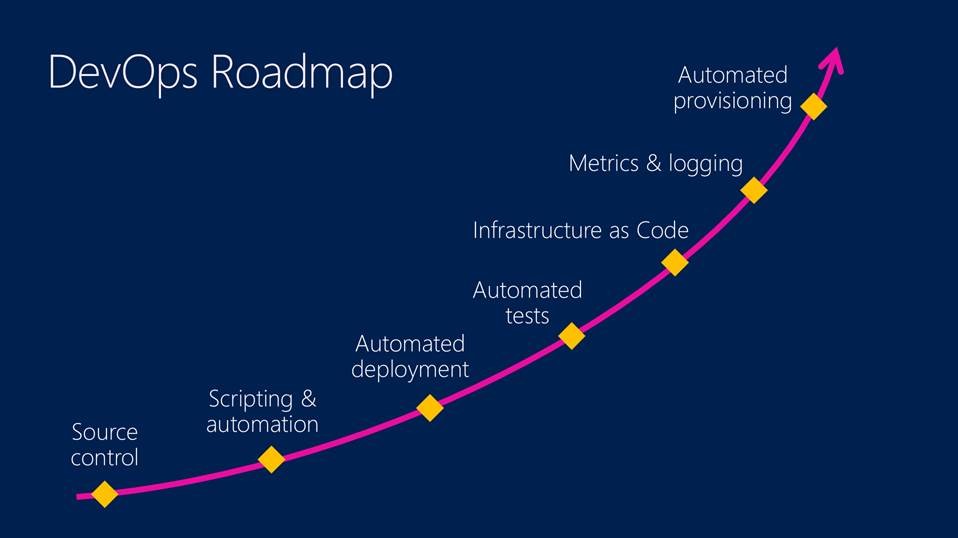
The benefit of doing it per Project, allows each project to perform a complete migration to DevOps, from top to bottom, taking on board the responsibility of solving the globally identified traditional bottlenecks (eg: converting Manual Testing to Automated Testing for their project only), without disrupting other projects still running using traditional processes.
The recommendation for this organisation is to continue to do the transition the later way.
CAMS/CALMS
John Willis and Damon Edwards (and later Jez Humble) coined the acronym “CALMS” to describe key aspects of DevOps53):
- Culture: “Culture eats strategy for breakfast.”(src: Peter Drucker).
- Automation: Automating repetitive, time-consuming, error-prone tasks yield big dividends.
- Lean: apply value-stream mapping, and plan to remove inefficiencies.
- Measurement: you can't improve what you don't measure.
- Sharing: friction-free information improves organizational performance.
DevOps Isn't NoOps
It’s a misconception that DevOps is Developers coming to wipe out Operations and do it themselves. The first and most obvious reasons this is a misconception is that Systems are written for the environment and processes they were intended to be run on. Organisations have legacy applications that were intended to be deployed and tested manually – they simply cannot be cost-effectively ported to an automated tested deployment process.
The second reason is DevOps – and its antecedents in Agile operations – are being initiated out of Operations teams more often than not54). This is because Operations have realized that practices need to be automated to keep pace with what is being expected from business stakeholders. The result has not been automating personnel out of a job, but instead – as lower level concerns become more automated – technically skilled staff start solving higher value problems.
References
The following sources provided facts for the above: * “DevOps with Quality” by GapGemini/Sogeti * https://en.wikipedia.org/wiki/Continuous_testing * History of DevOps * What is DevOps
Continuous Delivery Summary
Summary
@ccaum: Continuous Delivery doesn't mean every change is deployed to production ASAP. It means every change is proven to be deployable at any time.
Continuous Delivery is about ensuring ensure code is always in a deployable state (built, tested, packaged) in order to get changes of all types – new features, configuration changes, bug fixes and experiments – into the hands of users on demand, safely and quickly in a sustainable way.
Continuous Delivery recognizes that Coded Unit Tests and Static Tests cannot catch all functional logic. Unfortunately process maturity ends up dictating how much of the functional testing is automated (as opposed to IT:AD:Continuous Deployment which depends on all functional testing being automated).
Many projects are still somewhere on the continuum between barely more than Continuous Integration (with packaging added to the mix, but all functional testing still being manual) and the upper more mature practices ensuring that all functional testing is automated.
When implemented maturely, Continuous Delivery can completely eliminates the code freeze, integration, testing and hardening phases that traditionally follow “dev complete”.
Either way, in a Continuous Delivery based project, deployment to PROD remains a decided operation – unlike Continuous Deployment.
Continuous Delivery compared to Continuous Deployment
The fundamental difference between the two is that Continuous Delivery is when you make your software product available to the customer but the decision to upgrade/install it is manual. In the case of desktop apps, they have to download/install the update, and in the case of a web service, someone has to authorize it's deployment to live.
Continuous Deployment is when the upgrade is automatically deployed.
In other words, with IT:AD:Continuous Delivery, a product can be automatically delivered to production at the touch of a button, once approved – whereas with Continuous Deployment it is automatically deployed to end production.
The second fundamental difference between the two is that whereas Continuous Delivery can use some Continuous Testing, Continuous Deployment relies on using Continuous Testing to test the totality of the solutions's functionality.
Acceptance Test Driven Development
Summary
Continuous Delivery cannot be accomplished without a testing approach appropriate to the automation services provided by a full ALM Service.
The following are well-tested patterns to deliver the required tests.
Acceptance Test Driven Development
As per the Guidelines above, development will be developed using Test-Driven Development (TDD) approach. Specifically, Acceptance Test Driven Development (ATDD).
ATDD is a software development approach that relies on the turning the Acceptance Tests associated to Agile User Stories into automated tests first . The software is then improved to pass the automated tests before the build service allows the code to be integrated into the core code.
The base concept of the ATDD approach is its being opposed to allowing new code to be added that is not proven to meet acceptance tests that encapsulate requirements/User Stories.
The benefit of using ATDD include: * Developers pass 100% of the Acceptance Tests defined by Testers.
- Note that in addition to Tester defined Acceptance Tests, developers may also pass as many additional Unit Code Tests defined by written as well.
* 100% feature coverage. * Limits the addition of code that is not proven to meet a requirement. * A full suite of automated tests directly linkable to source User Stories/Requirements ensures that new code does not break previous functionality without the ability to understand the source of tension.
Acceptance Test Test Naming
The title used for Tests is advantageous to developers as well as good traceability.
The format to be used is {Type}_{ID}_{SubId}_{Test_Name}.
The practice of including the Work Item ID in the automated test's name adds value to developers on larger projects that are worked on for extended periods of time. An example of the value to developers is demonstrated below.
A new developer is tasked to write code for Story 2048. Upon completing the new code, the developer runs his previously written test, and meets the requirements of Story 2048. The developer then runs the whole suite of tests, and discovers that the new code breaks earlier tests (eg: Story 139). Having the ID of both conflicting Stories, the developer can present the two Stories back to the BA to sort out the difference, while the developer moves on to the next Story. Without the ID, the developer would be tempted to either comment out the previous tests in order to deliver on the current commitment – potentially negating previous investigative work and causing bugs to slip through.
The following demonstrates the use of the above convention to title a TDD driven test to indicate the relationship between the Test and the Story with an ALM identifier of 139. It's the 3rd Unit Test developed for the Story.
[Scenario]
[Example(1, 2, 3)]
[Example(2, 3, 5)]
public void S_139_3_Addition(int x, int y, int expectedAnswer, Calculator calculator, int answer)
{
...
}
Acceptance Test Driven Development: Test Naming (Cont)
Organisation specification requirements (often identified with Ids similar to REQ-xxxx) are referenced by testers when they design the Acceptance Tests. The following proposal needs to be tested as to being valuable for traceability reasons:
- the Acceptance Test name could reference Requirements (eg: REQ-xxxx) being met.
- the developer could embed the Requirements ID (eg: REQ-xxxx) in the Test Name as well:
{Type}_{ID}_{SubId}_{REQID}_{Test_Name}(eg:S_123_2_REQ_1234_Addition).
Acceptance Test Driven Development: Test Format
As stated elsewhere, the format of Acceptance Tests is important. When the Given-When-Then structure
is used the text can be used as the basis of BDD structure coded tests.
Tests must be developed following the Behaviour Driven Design Given-When-Then structure which is equivalent to the older Arrange-Act-Assert structure.
The following is a Demonstration of using XBehave.NET (a BDD based extension to xUnit.net) using the Given-When-Then structure:
[Scenario]
[Example(1, 2, 3)]
[Example(2, 3, 5)]
public void S_2049_1_Addition(int x, int y, int expectedAnswer, Calculator calculator, int answer)
{
    "Given the number {0}"    // or in C# 6 or later, $"Given the number {x}"
        .f(() => { });

    "And the number {1}"
        .f(() => { });

    "And a calculator"
        .f(() => calculator = new Calculator());

    "When I add the numbers together"
        .f(() => answer = calculator.Add(x, y));

    "Then the answer is {2}"
        .f(() => Assert.Equal(expectedAnswer, answer));
}
The result is that failing tests can be aligned 1-to-1 with the Acceptance Tests definitions. The Users Stories can be quickly found using the Story ID (eg: S_2049)
Requirements:
* REQ-xxxx: Coded Tests SHOULD be laid out according to the Given-When-Then structure.
Acceptance Test Driven Development: API Testing
The above TDD formatted tests can be extended with additional test tool libraries to develop dynamic API testing– but there are reasons not to.
APIs should not be tested from the point of view of the Server – but from the point of view of the Client.
In which case, a Test Runner such as Karma may be more appropriate.
Acceptance Test Driven Development: UX Testing
The above TDD formatted tests can be extended with additional test tool libraries to develop dynamic UX testing – but there are reasons not to.
Clients should be independent apps developed in TypeScript, developed separately from the Server side development.
In which case Testing tools specific to Typescript/Javascript development should be used. Such as Karma.
Considered Designs and Decisions
FAQs
None at this point in time.
Data Classification
Summary
Organisations are not put at risk by Environments, but by the Data used within the Environments.
Ensuring that Production Classified data is removed from environments reduces the organisation's risk.
Data Classification
Installations that manage production data are classified by the type of data they manage.
The highest Data Classification given to the information managed by a solution defines both non-functional requirements and system function requirements that must be met at various stages of the Application Lifecycle, including definition, development, operation and disposal phase.
Data Classification Rating
Data is either Unclassified, or classified as either Policy and Privacy Information or National Security Information55)56):
The rating specified depends on several factors.
Unclassified
Classified
Classified as Policy and Privacy Information
The security classifications for material that should be protected because of public interest or personal privacy are:
Classified as National Security Information
Data Classification Impact
The architecturally significant impact of the specified Data Classification are listed below and complied with in the relevant sections of this document:
Requirements:
- Electronic Data Transmission:
- REQ-xxxx: Electronically transmitted IN-CONFIDENCE Information MUST be marked as IN-CONFIDENCE.
- REQ-xxxx: Electronically transmitted RESTRICTED/SENSITIVE/+ Information MUST be marked RESTRICTED or SENSITIVE.
- REQ-xxxx: Electronically transmitted IN-CONFIDENCE/RESTRICTED/SENSITIVE/+ information MUST be transmitted across external or public networks (including the Internet) without being encrypted.
- REQ-xxxx: Electronically transmitted IN-CONFIDENCE/+ information MAY be Username/Password protected.
- Electronic Data storage:
- REQ-xxxx: All Electronically transmitted IN-CONFIDENCE/RESTRICTED/SENSITIVE/+ information (including data) is to clearly identify the originating Govt agency and data.
- REQ-xxxx: An appropriate statement SHOULD accompany all IN-CONFIDENCE transmitted data.
- REQ-xxxx: An appropriate statement MUST accompany all RESTRICTED/SENSITIVE/+ transmitted data.
- REQ-xxxx: Electronically transmitted RESTRICTED/SENSITIVE information transmitted across public networks (this includes the Internet) within NZ or across any networks overseas must be encrypted using a system approved by GCSB.
- Electronic Data storage:
- REQ-xxxx: Electronically stored IN-CONFIDENCE/RESTRICTED/SENSITIVE/+ Electronic files MUST be protected against illicit internal use or intrusion by external parties through two or more of the following mechanisms:
- User challenge and authentication
- Logging use at level of individual
- Firewalls and intrusion detection systems and procedures
- Server authentication
- OS-specific/ application-specific security measures
- Encryption (required for RESTRICTIVE/SENSITIVE or above)
* Electronic Electronic Disposal:
- REQ-xxxx: IN CONFIDENCE/RESTRICTIVE/SENSITIVE/+ information MAY be destroyed by using the delete function.
- REQ-xxxx: IN-CONFIDENCE Electronic media SHOULD be disposed of in a way that makes compromise highly unlikely.
- REQ-xxxx: RESTRICTIVE/SENSITIVE/+ Electronic media SHOULD be disposed of in a way that makes reconstruction highly unlikely.
- REQ-xxxx: IN CONFIDENCE/RESTRICTIVE/SENSITIVE/+ media is to be disposed of or sold, it MUST be purged using a GCSB approved secure delete facility or physically destroyed.
* Paper Storage:
- REQ-xxxx: IN-CONFIDENCE documents can be secured using the normal building security and door-swipe card systems that aim to simply keep the public out of the administration areas.
- REQ-xxxx: RESTRICTED and SENSITIVE documents should be stored in compliance with Archives NZ Storage Standard NAS 9901 Storage of Public Records or Archives.
- Paper Waste Disposal:
- REQ-xxxx: MUST comply with provisions of Archives Act 1957
- REQ-xxxx: IN-CONFIDENCE documents are to be disposed of in a way that makes compromise highly unlikely, such as depositing the documents in bins that are taken away for secure destruction.
- REQ-xxxx: RESTRICTED and SENSITIVE documents are to be disposed of or destroyed in a way that makes reconstruction highly unlikely, such as mechanical shredding.
User Base Growth
Summary
Determining the system storage requirements of a system is based on several factors.
- the national nature of this Organisation's reach,
- the nation's population size today and it expected growth57) per year,
- the expected lifespan of the system,
- planning for the higher requirements of the scenarios listed below,
- providing an average of 1.5MB per user per year (based on a combination of neglieable data record storage requirements and storage requirements uploaded average document types).
During the solution's lifespan the storage requirements of an LOB application appropriate for this solution is expected to need less than 5GB at the start and elastically grow if and as needed to 60GB over its lifespan.
Projected Usage based on doubling Every Year
Based on number of Users doubling every year:
<gchart 300×150 #C0C0C0 line center> Year 0=100000 Year 1=200000 Year 2=400000 Year 3=800000 Year 4=1600000 Year 5=3200000 </gchart>
Projected Usage based on National Population
Based on Population:
<gchart 300×150 #C0C0C0 line center> Year 0=4600000 Year 1=5060000 Year 2=5566000 Year 3=6122600 Year 4=6734860 Year 5=7408346 </gchart>
Projected Usage based on National Schools
Based on number of Schools in the country, increasing by 2%:
<gchart 300×150 #C0C0C0 line center> Year 0=2441 Year 1=2490 Year 2=2540 Year 3=2590 Year 4=2642 Year 5=2695 </gchart>
Projected Usage based on National Teachers
Based on number of Teachers in the country, increasing by 2%:
<gchart 300×150 #C0C0C0 line center> Year 0=50950 Year 1=51969 Year 2=53008 Year 3=54061 Year 4=55150 Year 5=56253 </gchart>
##### Projected Usage based on National Students
Based on number of Students in the country, increasing by 2%:
<gchart 300×150 #C0C0C0 line center> Year 0=762683 Year 1=777937 Year 2=793495 Year 3=809365 Year 4=825553 Year 5=842064 </gchart>
Web Development Constraints
Summary
It is common for web sites to be commissioned without basic rules of thumb to help guide whether decisions are optimal or not. One should questions designs that require 12 cores to handle 200 concurrent users.
below are listed some statistics to back design decisions made during the development of systems.
Network Constraints
Responsiveness
Responsiveness is dependent on latency, which is in turn dependent on the network the client is using to access the service.
In the case of NZ inhabitants using an organisation service hosted in Australia, the following information is relevant:
“Ping times [24ms] to Australia [on Verizon] are on a par with domestic times. Reannz (Research and Education Advanced Network New Zealand Ltd) reports domestic latency between the two furthest points of presence on its network, North Shore and Invermay is 22ms. While traffic from New Zealand’s South Island has to travel to Auckland before making the trans-Tasman hop, for New Zealand companies in Auckland, Eastern Australia has domestic-like latency.”58)
Assuming that an uncached page requires an average of 9 additional requests for associated css, images, scripts, and that the leading browser can parallelize 659) connections at a time, the additional latency to Australia – on Verizon – could be as low as 48ms.

If the above analysis is more or less correct, 2×15.87ms is faster than 2x48ms for a complete View request. But not by much.
If the page was optimized to keep the number of requests required below 6, the additional latency would be 24ms-15.87ms (8.13ms).
The actual page itself takes time too. With throughput from NZ to NZ being 26.21 Mbps, and Australia to NZ being 13.11 Mbps, a complete view takes 76ms (or 152ms) to be transferred from server to client.

In light of the above data, the latency from the network distance to Australia is negligible, and the most performance improvements will come from paying attention to how the application is actually put together, implementing basic design recommendations.
IIS Constraints
A current standard web server (eg: IIS on Windows Server 2012, 4 Core CPU) can handle 80,000 Requests per Second (RPS) for a static text page60).
When developing using .NET Core, the RPS increases to 1.1 million RPS:

A static text html page orchestrating requests for approximately 9 additional uncached requests for related static css, images and js files means only 1/10th the number of complete pages can be sent per second (ie 100,000 *pages).
The above implies that a .NET Core based app on a single web server is capable of servicing uncached requests for a static html page by the whole working population of New Zealand in just over 40 seconds.
At this point in time, it is hard to define the true cost of dynamic page websites. If you use server based UI development methods (ASP.NET, ASP.MVC, etc.) practically every page has the same cost as the above first single page. In other words, 10 requests per page. But if you are developing using SPA development practices, subsequent responses do not include images, css, etc. And so therefore the number of responses required for further operations drops closer to 1 response per operation.
Either way, if the application server does not do cross device calls, and is not performing non-trivial time consuming calculations, the cost of the dynamic assembly of the response stream can be assumed to be absorbed in the above.
NIC, DB and SAN Constraints
But a dynamic web page is only as fast as its slowest component – which can be the NIC, Database Service, or SAN.
Generally speaking, a 100Mbs NIC is only able to handle about 3000 batch requests per second, and a 1Gbs Card could get up to 6000 requests (1Gbs card should, but is not 10 times as fast).
Sql Server with a 3000 Batch Requests/Sec is typically high.
And then there is the SAN, which cannot be summarized.
Discounting the SAN for now, the above indicates that for a dynamic pages, due to the database bottleneck, the following responses can be achieved:
• 1000 dynamic pages, with 3 db hits per page, and judicious caching
• 3000 dynamic pages with 1 db hit per page, and judicious caching
Development Principles
The ability to develop and manage software over the whole lifecylce of a system is directly relatable to the quality in which it was assembled.
The following Development Principles clarify for Development Services expected approaches to solving problems. They demonstrate how to apply Architectural Design Principles at a more Technical Level.
Note that these Development Principles are not Development Patterns as they describe Development Approach Constraints, rather than provide repeatable development recipes.
- .NET Core over other compile frameworks. Rational: For Supportability reasons, prefer Open Source frameworks that are known within the Organisation.
- Automation over Manual Actions. Rational: Fore ROI and Responsiveness reasons, prefer solutions that reduce Costs over the whole SDLC (not necessarily just early development stage). Prefer solutions that allow repeated quality delivery of additional value. Candidates for automation include testing, migration, packaging, deployment, provisioning, documentation.
- API First. Rational: For Modularity and Integration reasons, Develop 8A available APIs first, then optionally develop a default Client to consume them.
- Single Page App (SPA) User Interface (UI) Frameworks over server side UI generation (MVC over WebForm)
- Domain Driven Design (DDD) at the server component level.
- MVC at the client component level.
- SOLID development patterns at the code level.
- Structure and Indexed SQL Datastores over NoSQL Datastores
- JSON over XML. Rational: JSON decreases bandwidth and storage requirements.
- ODATA over REST over WCF: Rational: For Portability and Maintainability reasons, prefer solving problems Statelessly with a restrained vocabulary of verbs.
- ORMs over direct Data Access
- EF over other ORMs
- Data Markdown/Creole over Richly formatted text (HTML, DOCX) over Richly formatted binary formats (RTF, PDF)
- Typescript over Javascript
- Unity or StructureMap over Ninject
- NLog over Log4Net over EntLib
- Optimize for all Interfaces (UI – but don't forget the Reports, APIs, etc.)
- Abstract Dependencies on External Systems
- Use abstraction to remove dependencies on external systems
- Use EF, rather than Sql Server.
- Alert using the Organisation Infrastructure.
- Alerting, based on providing Monitoring and Event Logging, is to be configured within the Organisation's infrastructure.
- Audit all activity.
- Audit all activity. Including Views.
- System Authentication Credentials will not be recorded or transmitted.
- ie, for Sql Server, Use Integrated Security rather than use UserName + Password.
- Automate Delivery.
- Automate Testing
- Commit Regularly
- Deployment Operations must be idempotent.
- Develop against supported frameworks (.NET, EF, Nuget, etc.)
- Develop using TDD.
- Develop using Known Patterns
- Do not re-solve engineering problems. Research whether problems can be addressed using pre-existing industry patterns, starting with GoF Design Patterns.
- Develop using SOLID Patterns
- Develop Using DRY Principle
- Do not use Errors for Flow Control
- Do not trap Errors unnecessarily.
- ENvironment setting changes must not require redeployment.
- Prefer supported Execution Environments (IIS, Sql Server, etc.) unless backed by a Decision or Briefing Paper.
- Prefer Open Source
- WCF is acceptable between System Tiers.
- Team Agree on Conventions. Prefer Microsoft .NET Coding Conventions.
- Follow Microsoft Security Standards.
- Follow OWASP Recommendations
- Trace Unhandled Errors
- Use AOP to solve cross cuttng concerns.
- Use in-Application Session Solutions.
- Use Meaningful and Traceable Coded Test Names
- Use Host Caching in Every Tier.
- Use Dedicated Service Accounts for Services.